
Overview:
Your dashboard is your command center. This is where you can see Privacy Bee actively working on your behalf in real time. This article walks you through what each section means and how to use it effectively.
Privacy Risk Score
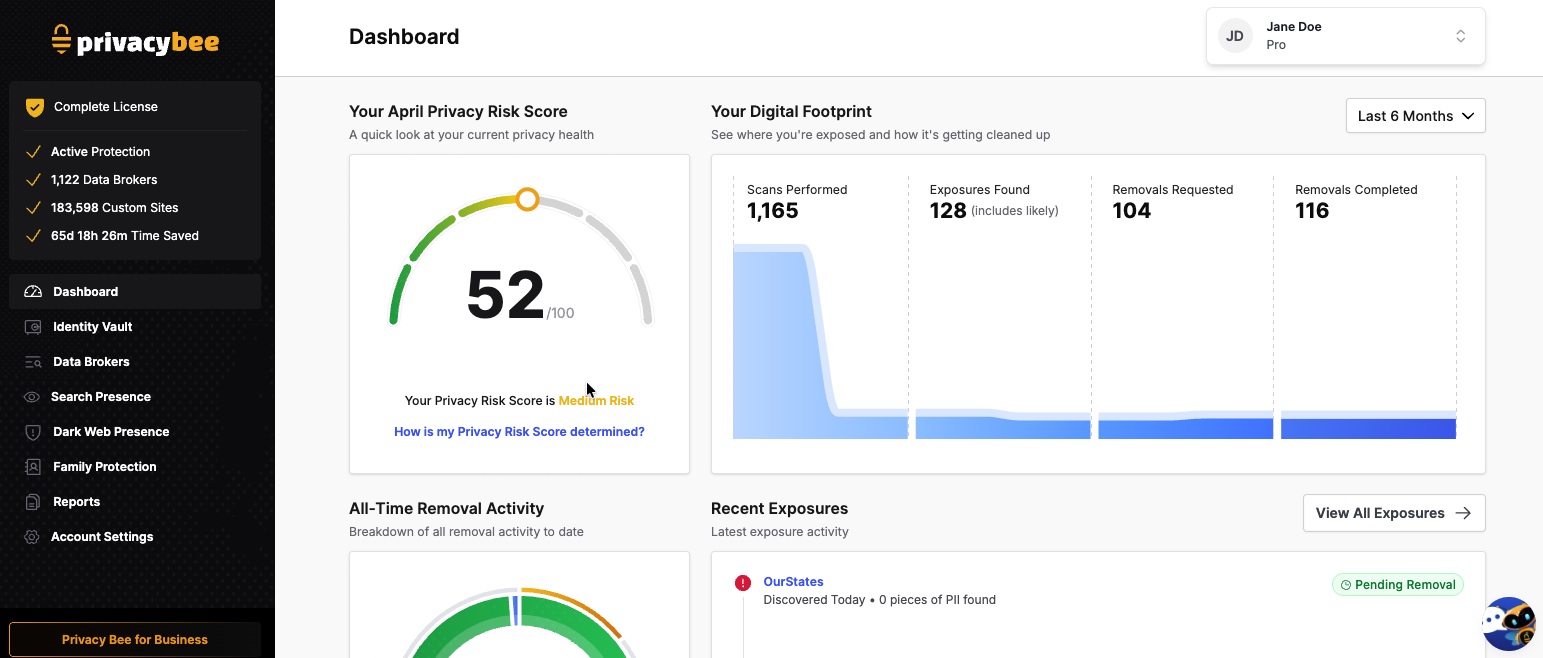
The Privacy Risk Score is displayed prominently at the top of your dashboard. It gives you a snapshot of how exposed your personal information currently is online - and how easily it could be accessed or misused.
Your score is calculated based on:
- The number of exposures linked to your information
- The visibility and popularity of the sites hosting your data
- The type and amount of personal information involved
Don’t be alarmed if your score feels high when you first log in - most users start with a medium or higher score simply because their data has been sitting unmanaged across data broker sites for some time. Your score will improve over time as Privacy Bee gets to work scanning and removing your exposed information.
It’s also normal for your score to fluctuate or stay the same for periods of time. This can happen when new exposures are discovered while others are being removed - progress is still happening behind the scenes, even when the number doesn’t move.
Your Digital Footprint
This section visualizes Privacy Bee’s activity over time and shows you the scope of work being done on your behalf:
- Scans Performed - The total number of scans Privacy Bee has completed over the lifetime of your account.
- Exposures Found - The total number of exposures identified during scans, including information that is confirmed or likely exposed online.
- Removals Requested - The total number of Data Subject Access Requests (DSARs) and requests to delete your information from company databases.
- Removals Completed - The total number of exposures successfully removed.
All-Time Removal Activity
This section summarizes all removal activity since you joined Privacy Bee:
- Removals Requested - The total number of requests submitted, including both completed and in progress
- Completed - Removal requests that have been successfully processed
- In Progress - Requests currently being worked on
- Re-Exposures - The number of sites that have republished your information after it was previously removed
Recent Exposures
This section lists your most recently discovered exposures, showing where your data was found, when it was discovered, and the current status of each removal.
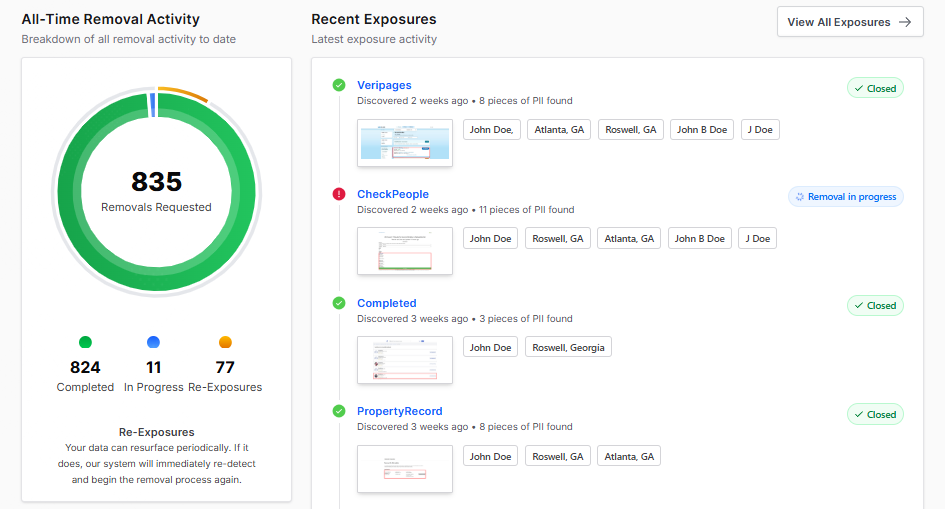
Here’s what each status means:
- Discovered - The exposure has been detected and is awaiting action from our privacy team.
- Removal In Progress - A removal request has been submitted, and we are waiting for the company’s response. Depending on the site, this can take up to three months or longer as some data brokers take time to comply.
- Closed - The exposure was successfully removed in our most recent scans. We will continue monitoring in case it returns.
- Clean - No exposure has been found on this site.
- Failed - The opt-out path is currently unavailable, the company did not respond, or the data did not match the details in your Identity Vault. The exposure will automatically reopen on the next scheduled scan, and we’ll attempt the request again.
A “Failed” status does not mean Privacy Bee has given up. Our system will automatically retry on the next scheduled scan.
A “Closed” status can mean one of three things:
- Successfully removed - Your information was confirmed as removed in our most recent scans. Privacy Bee will continue monitoring this site in case your data reappears.
- Company unresponsive - All reasonable removal attempts have been exhausted, and the site has not responded. Privacy Bee will automatically reopen the exposure on the next scheduled scan and try again.
- Data did not match - The exposure details did not fully match the information in your Identity Vault. If this happens, check that your Identity Vault is as complete and accurate as possible to improve future match rates.